Cut course creation time dramatically
1–2 daysper course, down from 4–5
Shipped Product design case study · Lyearn
A progressive, context-led AI system that turns trusted company knowledge into structured, reviewable learning, without removing the course creator from the process.
How would you like to create your course?
Start · choose how to create the course
Interactive recreation of the shipped product, rebuilt from a screen recording of the live implementation.
Lyearn’s learning management system (LMS) could deliver training, but L&D teams still built every course by hand. I designed an AI course creator inside the LMS that turns their own documents into a structured course.
Admins read dense source material, decided what mattered, set learning goals, structured modules and wrote every lesson. Creators who tried outside AI tools still copied, pasted and reformatted it all into the LMS.
Setup captures the context once. The creator approves learning outcomes before AI builds the structure, content and assessments, so each approved step feeds the next.
L&D teams moved from writing courses to checking them, and kept control at every stage.
Lyearn already delivered training, but creating it was manual. Admins started from a blank course and had to read dense source material, decide what mattered, define learning goals, structure modules and then write every lesson.
“I already have a long product document. To make it training-ready, I still have to read it1, decide what matters2, define what my team should learn3, structure it into modules4, and then create the lessons5.”
 L&D manager, enterprise clientRaised in client calls
Most of the effort happened before content creation even began.
A major enterprise client was preparing training for a new card-product rollout. The client trains more than 56,000 learners across 20+ business units, from voice and telesales to KYC and NRI banking. Manual authoring would slow readiness and stretch L&D teams. Competitors were already offering AI authoring, and the client was evaluating alternatives, so closing this gap was critical to retaining the account.
Cut course creation time dramatically
Stay accurate to the client’s own material
Move L&D from authoring to reviewing
Creators were already drafting with outside AI tools. It was faster, but it meant juggling three places: the source doc, the AI tool and the LMS.
The opportunity wasn’t to introduce AI. It was to bring that speed into the workflow, without the friction.
Optimise for an accurate first pass instead of endless prompting, regeneration and wasted credits.
Ask the key questions once, upfront, then follow a consistent flow so the system always knows its context.
Edit, regenerate one item or all of them, and move forward only when a stage is ready.
| Approach | Lyearn AIOur approach | Sana | 360Learning | Docebo | TalentLMS |
|---|---|---|---|---|---|
| Generation style | Progressive, outcomes first | Fast source-to-course | Outline first, then course | Draft, then refine | Fast one-shot |
| Prompt burden | LowKey questions asked once in setup | Medium | Medium | Medium | Low–medium |
| Human checkpoints | At every stage | Edit after generation | Review outline first | Edit blocks + structure | Lighter review |
Competitor approaches as reviewed during discovery.
Select an approach to see where the creator gets a say
Creator checkpoint: you review before moving on
Two choices were debated internally. Both added a step upfront, and both removed rework later.
The team, like much of the industry, leaned towards chat. But every new message is another inference step: context gets buried, users keep explaining themselves, and credit usage climbs.
My callI pushed to ask the important questions once in setup, then carry that context forward.
Going straight to an outline was faster, but AI would structure the course before the learning goals were explicit: plausible, yet misaligned. Outcomes cost an extra step and more AI credits.
My callI proposed defining and reviewing outcomes before AI expands them into structure and content.
Each approved step becomes stronger context for the next one. Select a step to see who does what.
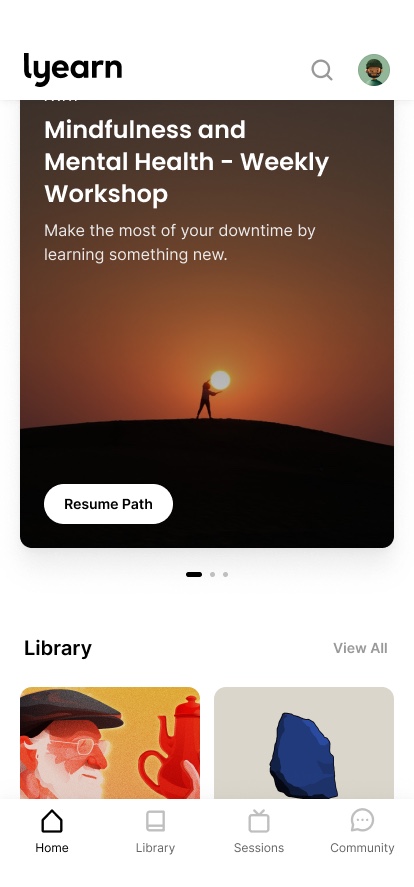
Everything above happens on the admin side. The finished course reaches learners across 20+ business units, on desktop or in the Lyearn mobile app. Over the past year, 23,500+ of them were active on the platform.

The goal wasn’t the fastest possible generation. It was the fastest path to the right course.
A daily loop with product, AI, and engineering connected workflow decisions to implementation.
Capture key inputs once and provide targeted regeneration.
A 50 MB upload limit, with multiple smaller documents supported.
Support both individual changes and stage-wide regeneration with instructions.
Keep relevant earlier information in side panels; use outcome labels and colours across the structure.
Make knowledge level, weekly time, and duration explicit inputs.
Five hard limits, five design decisions. Each constraint became part of the flow instead of a workaround.
Course structure · try it
With many outcomes and lessons, users could easily lose track. The structure keeps earlier decisions in view. Select an outcome to see which lessons cover it.
Lessons
Every generated lesson has a reason to exist.
Screens captured from the live course creator. Select any screen to view it larger.
Revising outputs individually was tedious when the same change applied to an entire stage.
One common instruction revises all outputs in the current stage, using prior-step context.
The team also wanted a way to generate the whole course at once.
An optional path generates the complete course for review and editing afterward.
Teams uploaded their existing knowledge pages, but some of those pages weren’t relevant to the course they were building.
Every uploaded PDF gets its own comment field. Creators tell the AI how to use that file, such as which pages to skip, and the AI follows it.
After trying these additions, the team reported being satisfied with the updated workflow.
Context side panels and colour coding were designer-led improvements. These findings are qualitative feedback, not measured usability gains.
4–5 days1–2 days
Time to create one in-depth course · project-reported result after rollout
1–2 days per course. The striped part is the range.
One row per participant: time to build a course before and after, and what they said.
Per-person values are illustrative.
Average in this illustration: 4.5 days → 1.5 days per course, in line with the reported team result of 4–5 days → 1–2 days. Rows and quotes are placeholders to be replaced with real study data.
Uploaded content is the source of truth, and outcomes are set first, so structure and content start out accurate.
The client now uses the AI Course Creator for new courses.
Shipping it closed the AI gap and helped retain a key enterprise client.
Context: the courses created here serve a client audience of 56,000+ learners. Saving around three days per course matters at that scale.
For L&D teams, the biggest change was relief: what took most of a week now takes a day or two.
The real product work is shaping context, review and recovery.
Better output came from designing better inputs and carrying them forward, not from asking users to write better prompts.
The earlier a wrong direction is caught, the less has to be regenerated later.
Users need to change one item, a whole section or the whole course, depending on what went wrong.
Help creators see what actually needs attention, instead of reviewing everything equally.
Design to code, MGSA, Career paths and Org structure have their own pages. Knowledge base is being written up.